Convert Qcow2 Azure VM Image
This guide demonstrates how to convert a QCOW2 image to a fixed-size VHD format suitable for Azure.
Prerequisites
Ensure you have the following tools installed:
qemu-img
Directory Contents
# ~/Desktop/CloudImgae ll
# brew install qemu
total 17252936
-rw-r--r--@ 1 bohu  staff   2.3G Apr 15 12:41 aliyun_3_x64_20G_nocloud_alibase_20250117.qcow2
-rw-r--r--  1 bohu  staff   1.7G Apr 15 13:22 OpenCloudOS-GenericCloud-8.10-20240729.0-20240730.1137-x86_64.qcow2
-rw-r--r--@ 1 bohu  staff   1.5G Apr 12 10:16 openEuler-24.03-LTS-SP1-x86_64.qcow2
-rw-r--r--@ 1 bohu  staff   1.2G Apr 15 09:26 openEuler-25.03-x86_64.qcow2
-rwxr-xr-x@ 1 bohu  staff   1.7K Apr 22 14:51 qcow2-to-vhd.sh
-rw-r--r--@ 1 bohu  staff   929M Apr 12 17:08 rhel-9.5-x86_64-kvm.qcow2
-rw-r--r--@ 1 bohu  staff   582M Apr 15 10:12 Rocky-9-GenericCloud-Base.latest.x86_64.qcow2
Conversion Script
Below is the script used for the conversion:
#!/bin/bash
# Color definitions
GREEN='\033[1;32m'
BLUE='\033[1;34m'
YELLOW='\033[1;33m'
MAGENTA='\033[1;35m'
RED='\033[1;31m'
RESET='\033[0m'

# Azure settings
AZ_ACCOUNT_NAME="nluatpoc"
AZ_CONTAINER_NAME="images"

# Input check
INPUT_QCOW2="$1"
if [ -z "$INPUT_QCOW2" ]; then
  echo -e "${YELLOW}Usage: $0 <qcow2-file>${RESET}"
  exit 1
fi

# Dependency check
command -v qemu-img >/dev/null || { echo -e "${RED}Error: qemu-img not found.${RESET}"; exit 1; }
command -v jq >/dev/null || { echo -e "${RED}Error: jq not found.${RESET}"; exit 1; }

# Setup
BASENAME=$(basename "$INPUT_QCOW2" .qcow2)
WORKDIR=$(mktemp -d)
SCRIPT_DIR=$(pwd)
MB=1048576

echo -e "${BLUE}Copying input QCOW2 to temporary directory:${RESET} $WORKDIR"
cp "$INPUT_QCOW2" "$WORKDIR/$INPUT_QCOW2"
cd "$WORKDIR" || exit 1

# Convert QCOW2 to RAW
echo -e "${BLUE}Converting QCOW2 to RAW format...${RESET}"
qemu-img convert -f qcow2 -O raw "$INPUT_QCOW2" "$BASENAME.raw"

# Calculate and round virtual size
echo -e "${BLUE}Checking and rounding RAW size...${RESET}"
RAW_SIZE=$(qemu-img info -f raw --output json "$BASENAME.raw" | jq '.["virtual-size"]')
echo -e "${MAGENTA}Original size: ${RESET}${RAW_SIZE} bytes"

ROUNDED_SIZE=$(( (RAW_SIZE + MB - 1) / MB * MB ))
echo -e "${MAGENTA}Rounded size:  ${RESET}${ROUNDED_SIZE} bytes"

# Resize the image
qemu-img resize "$BASENAME.raw" "$ROUNDED_SIZE"

# Convert to fixed-size VHD
echo -e "${BLUE}Converting RAW to fixed-size VHD...${RESET}"
OUTPUT_VHD="$SCRIPT_DIR/$BASENAME.vhd"
qemu-img convert -f raw -o subformat=fixed,force_size -O vpc "$BASENAME.raw" "$OUTPUT_VHD"

echo -e "${GREEN}VHD created at:${RESET} $OUTPUT_VHD"
echo


# Prompt for confirmation
read -p "$(echo -e "${YELLOW}Do you want to upload the VHD to Azure Storage? (y/n): ${RESET}")" confirm
if [[ ! "$confirm" =~ ^[Yy]$ ]]; then
  echo -e "${RED}Upload cancelled by user.${RESET}"
  exit 0
fi

# Upload to Azure Storage
echo -e "${YELLOW}Uploading to Azure Storage account...${RESET}"
if az storage blob upload \
  --overwrite \
  --type page \
  --account-name "$AZ_ACCOUNT_NAME" \
  --container-name "$AZ_CONTAINER_NAME" \
  --name "$BASENAME.vhd" \
  --file "$OUTPUT_VHD" \
  --only-show-errors; then
  echo -e "${GREEN}Upload successful!${RESET}"
else
  echo -e "${RED}Upload failed. Please check the above error.${RESET}"
  exit 1
fi

# Cleanup function
cleanup() {
  echo -e "${BLUE}Cleaning up temporary directory:${RESET} $WORKDIR"
  rm -rf "$WORKDIR"
  echo -e "${GREEN}Cleanup complete.${RESET}"
}

# Prompt for cleanup
read -p "$(echo -e "${YELLOW}Do you want to delete the temporary working directory? (y/n): ${RESET}")" clean_confirm
if [[ "$clean_confirm" =~ ^[Yy]$ ]]; then
  cleanup
else
  echo -e "${MAGENTA}Temporary files preserved at:${RESET} $WORKDIR"
fi
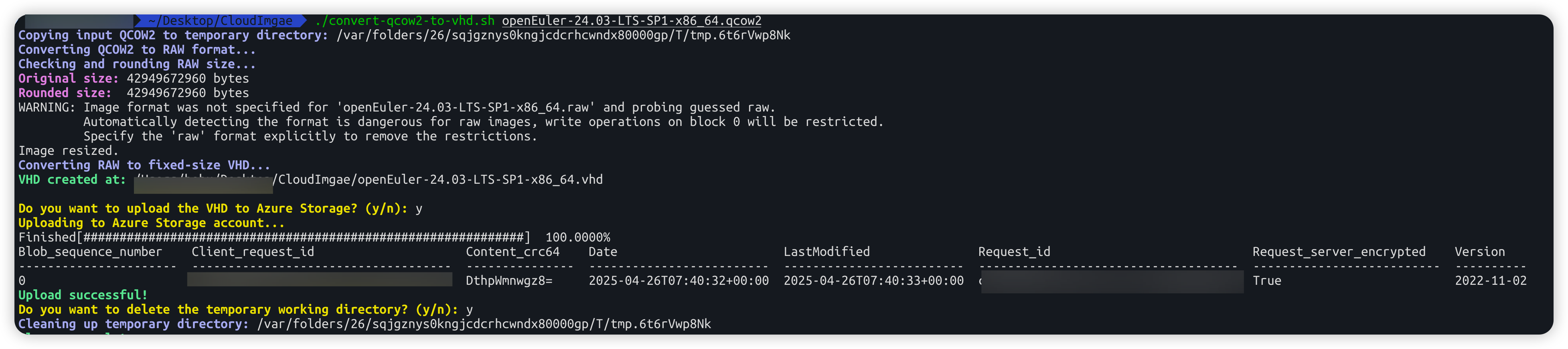
Example Execution